|
|
|
| 1.5 When you forget password |
When you forget your happy password, don't worry, you have a way to recover your password, provided that you still remember the email
address you used to register your SMS user account.
If connection mode of your SMS server is not 1, just click on the link "Forget Password" on the login page (Figure 1.3.1), it will
redirect you to the first page of password recovery process as Figure 1.5.1 shown. Input the email address of your user account, then
click the button "Send Verification Code" and select "OK" on the popup dialog box.
|
| |
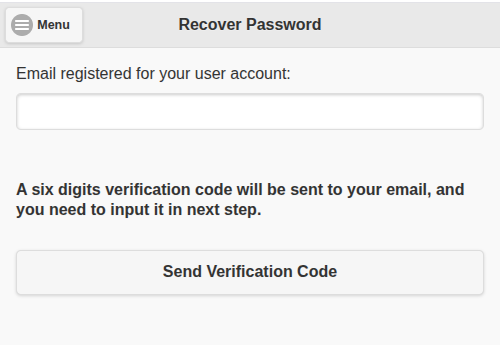
Figure 1.5.1 |
| |
|
A six digits verification code like Figure 1.5.2 will be sent to you via email, and you will be switched to next step like
Figure 1.5.3 shown. Just Input the verification code obtained in here, and click the button "Verify Code".
|
| |
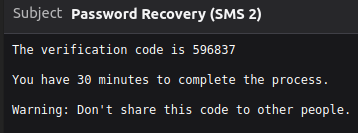
Figure 1.5.2 |
| |
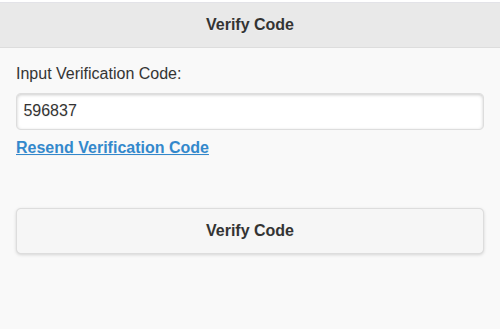
Figure 1.5.3 |
| |
|
If the verification code is correct, you will be switch to the password amendment page like Figure 1.5.4. In here, you
can input a new happy password for your SMS account. Please note that the whole process must be completed within 30
minutes. Otherwise, the password recovery session will be timeout, and you need to restart the process from the beginning.
|
| |
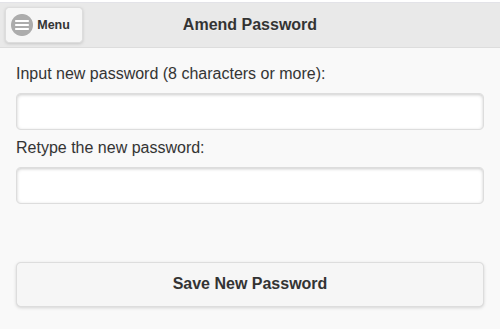
Figure 1.5.4 |
| |
Remark:
If connection mode of SMS server is 1, you need to contact system administrator or your referrer to recover your password.
|
|
|
|


